Thread or Wi-Fi: Choosing a Network for Matter Devices
- Matter defines what devices say; Thread and Wi-Fi are the roads the messages travel on. A device is controlled the same way, with the same data, whichever road it uses.
- Battery devices (locks, sensors, wireless buttons) almost always use Thread: it sips power, so batteries last a long time.
- High-bandwidth devices (cameras, doorbells, TVs, large appliances) use Wi-Fi or Ethernet.
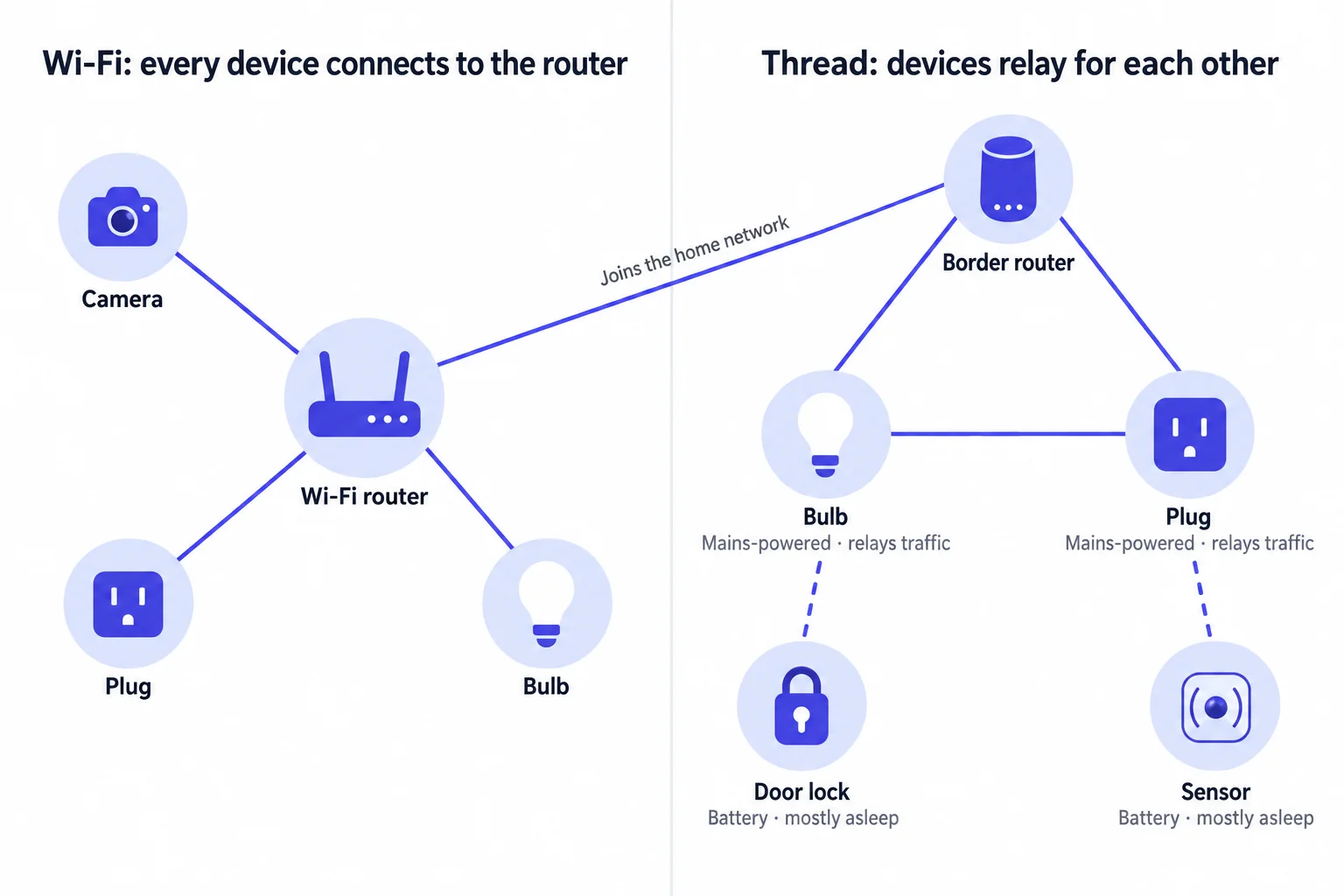
- Small mains-powered devices (lights, plugs, switches) come both ways: the Wi-Fi version works as soon as it joins your router; the Thread version needs a border router in the home, but each one relays traffic for its neighbors, so the network gets sturdier as you add more.
Thread or Wi-Fi is one of the first questions you hit when buying Matter devices or building a Matter product. This page explains where the two sit in Matter, compares them point by point, and ends with a recommendation for each kind of device.
Where Thread and Wi-Fi fit in Matter
Matter itself only defines the upper layers: what a device can do (Clusters), how to read its state, how to send it commands and how to encrypt it all. How the data actually travels is left to existing networks underneath — Wi-Fi, Thread or Ethernet. Bluetooth is only used briefly during setup.
An analogy: Matter is a common language everyone agreed on, and Wi-Fi and Thread are two kinds of road. Wi-Fi is a city highway — wide and fast, but every car has to pass through the same junction (the router). Thread is a network of footpaths through a neighborhood — slower and effortless, and neighbors can pass messages along for each other. Whichever road a message takes, it is in the same language, which is why Apple, Google and Amazon apps control both kinds of device in exactly the same way.
Just as important, Thread and Wi-Fi both carry IP (IPv6). A command your phone sends over Wi-Fi reaches a Thread device through a border router without any translation. For which layers each protocol covers, see Protocol Comparison · Placing them on the seven-layer model.
Key differences at a glance
| Aspect | Wi-Fi | Thread |
|---|---|---|
| Radio | 2.4 GHz / 5 GHz; many smart devices support 2.4 GHz only | 2.4 GHz, IEEE 802.15.4 (the same radio as Zigbee) |
| Speed | Tens to hundreds of Mbps, enough for video | 250 kbps, enough for commands and sensor data only |
| Topology | Star: every device connects straight to the router | Mesh: mains-powered devices relay for each other and route around a device that drops out |
| Power | High; devices are almost always mains-powered | Low; battery devices can sleep most of the time |
| Extra hardware | None; your home router is enough | At least one Thread border router (built into many speakers and TV boxes) |
| With many devices | Everything crowds onto the router; entry-level routers may struggle | More mains-powered devices mean wider coverage and a sturdier network |
| Typical devices | Cameras, doorbells, TVs, large appliances, plus many lights and plugs | Locks, sensors, buttons, radiator valves, plus many lights and plugs |
Who's who in a Thread network
Wi-Fi's structure is familiar: one router, and every device connects to it. Thread is a mesh, and the devices in it split the work automatically based on how they are powered:
| Role | Usually played by | What it does |
|---|---|---|
| Router | Mains-powered devices: lights, plugs, switches | Relays data for other devices; the backbone of the mesh |
| Leader | One router, elected automatically | Manages the network (assigns router IDs, distributes network data); if it goes offline, the other routers elect a new one |
| REED (Router-Eligible End Device) | Mains-powered devices | Acts as an end device until the network needs more routers, then promotes itself |
| End Device | Mains-powered devices that don't relay | Always on, but only sends and receives its own data |
| Sleepy End Device | Battery devices: locks, sensors, buttons | Sleeps most of the time and wakes periodically to collect messages; the most power-efficient role |
| Border Router | HomePod mini, some Apple TV 4K models, Google Nest Hub (2nd gen) and others | Connects the Thread mesh to the home Wi-Fi / Ethernet network; the Thread devices' way out |
The mesh heals itself: unplug one mains-powered device and traffic reroutes through another router. People often say "the more Thread devices, the better", but strictly it is mains-powered Thread devices that make the network better — battery devices don't relay, so adding more of them doesn't extend the mesh.
To see which role a Thread device currently plays, read the RoutingRole attribute of the
ThreadNetworkDiagnostics cluster; its neighbor table, channel and network name are in the same cluster.
Border routers: the way out of a Thread network
The Thread mesh and your home Wi-Fi are two separate networks. Your phone doesn't speak Thread, so everything relies on a border router forwarding traffic between the two. Without one, your phone can neither add Thread devices nor control them.
- Many devices already have one built in: HomePod mini, some Apple TV 4K models, Google Nest Hub (2nd gen), some Amazon Echo models, and a number of routers and hubs. Look for "Thread Border Router" in the specs before you buy.
- It forwards, it doesn't translate: Thread devices already speak Matter, so the border router just moves packets from one network to the other. That is different from a Zigbee hub, which has to translate Zigbee commands into another protocol.
- You can have several: multiple border routers can serve the same Thread network; if one goes offline, the others take over.
- Cross-brand sharing is improving: border routers from different brands used to create separate Thread networks, scattering devices across them. Thread 1.4 requires border routers to join an existing network and share network credentials across platforms, and Matter 1.4 brought in Thread 1.4 — see the Roadmap.
Border router, controller, bridge and "hub" are often used interchangeably. For what each one actually does and which ones your home needs, see Matter Hubs, Border Routers and Bridges Explained.
Why battery devices almost always choose Thread
To be fast, a Wi-Fi radio stays on and keeps a connection to the router, which uses a lot of power — so Wi-Fi devices are almost always mains-powered. The few battery-powered Wi-Fi devices (battery cameras, for example) either carry large batteries or need frequent charging.
A Thread sleepy end device switches its radio off most of the time, wakes up periodically to ask "anything for me?", and goes straight back to sleep once it's done. Door and window sensors, temperature sensors and wireless buttons can run for a long time on one or two batteries.
The trade-off is slightly slower response: a command has to wait until the device wakes up. Matter manages the schedule of these "intermittently connected devices" with the ICD Management cluster: Short Idle Time (SIT) devices usually wake at least every dozen seconds or so, so a controller only has to wait briefly; Long Idle Time (LIT) devices can sleep for hours and save more power, but a controller can only reach them after they check in (Check-In). Devices that must respond on demand, such as locks, usually wake up very often. Battery level itself is read from the PowerSource cluster.
What to choose for each device
| Device | Recommendation | Why |
|---|---|---|
| Door locks | Thread | Battery-powered, and Thread saves power; Wi-Fi locks exist but usually need bigger batteries or more frequent changes |
| Door/window, temperature, motion and other sensors | Thread | Battery-powered, little data |
| Wireless buttons and remotes | Thread | Battery-powered and expected to respond instantly |
| Radiator thermostat valves | Thread | Mounted on the radiator and battery-powered |
| Bulbs and light strips | Either | The Wi-Fi version doesn't depend on a border router; the Thread version strengthens the Thread mesh |
| Plugs and in-wall switches | Either; prefer Thread if you have many Thread devices | A mains-powered Thread device becomes a router and boosts coverage for nearby locks and sensors |
| Wall thermostats | Either | Usually wired for power; depends on what the manufacturer offers |
| Cameras and video doorbells | Wi-Fi or Ethernet | Video needs bandwidth far beyond Thread's 250 kbps; Matter only added camera device types in 1.5 |
| TVs, speakers, large appliances | Wi-Fi or Ethernet | Lots of data, and they are mains-powered and networked anyway |
A Wi-Fi version has the lowest barrier for users: no border router needed, it just joins the router. A Thread version requires the user to own a border router first, and in return offers lower power and a network that gets sturdier over time. Mains-powered products are built both ways; for battery products, Thread is essentially the only option.
How setup differs
Setting up either kind of device is almost identical: scan the code → find the device over Bluetooth and open an encrypted session → issue it a certificate and add it to a Fabric → send it network details → the device comes online. The only difference is the "network details" step:
- A Wi-Fi device receives your Wi-Fi name and password.
- A Thread device receives a set of Thread network parameters (network name, channel, network key and so on, together called the Operational Dataset). Your phone first gets these parameters from the border router in your home — so without a border router, a Thread device can't even finish setup.
This step is handled by the NetworkCommissioning cluster; for the whole flow, see Concepts · Commissioner and Commissioning.
Common Wi-Fi pitfalls
- 2.4 GHz only: many Wi-Fi smart devices support 2.4 GHz only. If your router merges 2.4 GHz and 5 GHz under one network name, a few devices fail to set up; splitting the bands temporarily can help.
- No guest network, no AP isolation: Matter finds devices on the local network using IPv6 and multicast. If the phone and the device are isolated from each other, they can't see each other — typically setup stalls at the last step, or the device shows "No Response" afterwards.
- Mind your router's capacity: with dozens of devices online, entry-level routers may drop connections. Moving some mains-powered devices to Thread takes load off the router.
Wi-Fi signal strength, channel and more can be read from the WiFiNetworkDiagnostics cluster.
Common questions
How are Thread and Zigbee related?
They use the same radio (IEEE 802.15.4 at 2.4 GHz), and many chips can run either. The difference is higher up: Zigbee covers everything from the radio to the application layer and needs a hub to translate before it can talk to other systems, while Thread only handles networking, is IP-based and carries Matter directly with no translation. See the Protocol Comparison.
Can I use Thread devices without an Apple or Google speaker?
Yes, as long as your home has any Thread border router: a hub from another brand, a router with a built-in border router, or Home Assistant with a Thread radio plugged in (such as the official Connect ZBT series) will all do.
Can Thread and Wi-Fi devices be mixed?
Yes. The two can be mixed freely in one home; they look the same in the app, and scenes and automations work across both — to Matter they are the same kind of device.
Do Wi-Fi devices need a hub?
Not at the protocol level — joining your home router is enough. But the Apple, Google and Amazon apps generally require one of their own hubs in the home (a speaker, smart display or TV box) to run automations and provide remote access. See What does my home need?