Do You Need a Matter Hub? Controllers, Border Routers and Bridges Explained
- "Hub" is a catch-all word. In Matter it can mean three completely different roles — a controller, a Thread border router or a bridge. Many products play several roles at once, which is why they are so easy to mix up.
- By the protocol: Wi-Fi devices can be controlled as soon as they join your home router; Thread devices need a border router; Zigbee and other older devices need a bridge to get into Matter.
- In practice: the Apple, Google and Amazon apps generally require one of their own hubs in the home (a speaker, smart display or TV box) to run automations and provide remote access — and that hub is often a border router as well.
"Do Matter devices need a hub?" is a question almost every newcomer asks, and it is hard to answer because "hub" is used for several different things. This page first separates the roles in one table, then explains what each one does, when you need it and how it shows up in device data, and finally tells you what your home actually needs.
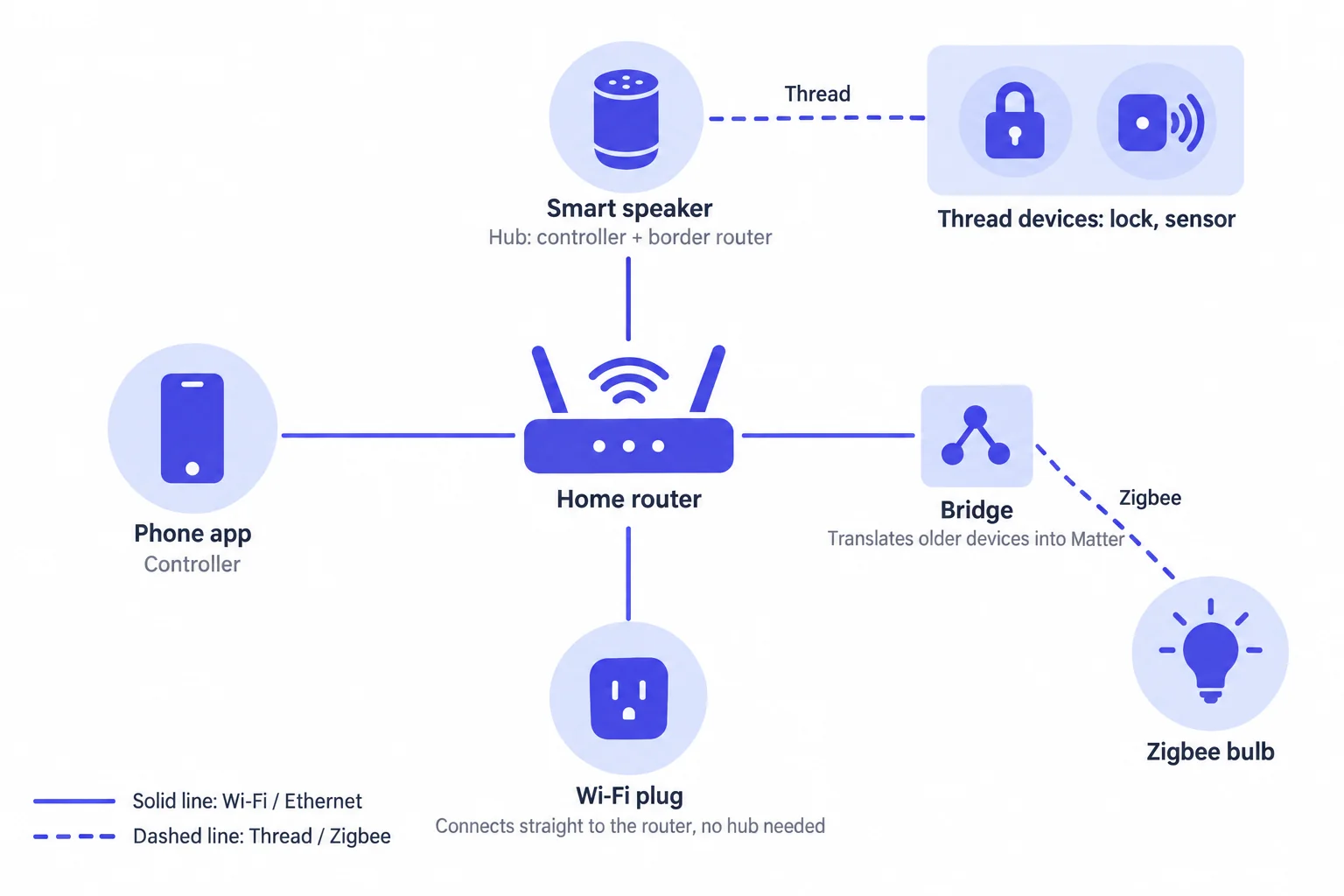
The roles in one table
| Role | What it does | Speaks Matter? | When you need it | Common examples |
|---|---|---|---|---|
| Controller | Sends commands, reads state, runs automations | Yes | Always; your phone app is one | Phone apps, HomePod, Apple TV, Nest Hub, Echo, Home Assistant |
| Border Router | Connects the Thread mesh to the home Wi-Fi / Ethernet network | Doesn't need to; it only forwards data | When you have Thread devices | HomePod mini, some Apple TV 4K models, Nest Hub (2nd gen), some Echo models |
| Bridge | Translates Zigbee, Z-Wave and other older devices into Matter devices | Yes, and the other protocol too | When you want older devices in Matter | Philips Hue Bridge, Aqara M2 / M3, IKEA DIRIGERA |
| Hub | A platform term: usually an always-on controller, often doubling as a border router | Yes | Generally required by the Apple, Google and Amazon apps | HomePod, Apple TV, Nest Hub, Echo |
| Home router | Ordinary internet access; Wi-Fi devices and phones connect to it | Doesn't need to | Always, but it doesn't have to "support Matter" | Any Wi-Fi router |
Controllers: the ones giving orders
A controller is whatever sends commands to a device and reads its state. When you tap "turn on" in a phone app, that app is the controller; a smart speaker switching lights off on a schedule or Home Assistant running an automation is a controller too.
- Setting up and controlling can be separate jobs: the role that brings a device into your home is the Commissioner, usually a phone app; whatever controls the device day to day afterwards is a Controller. Phone apps usually do both. See Concepts · Commissioner and Commissioning.
- One device can have several controllers: Apple Home, Google Home and Home Assistant each form their own Fabric, and Matter requires devices to support at least 5 at the same time. When you share a device with a second platform, the first platform temporarily opens a commissioning window on the device — see AdministratorCommissioning.
- Why a phone isn't enough: phones leave the house and go to sleep, so they can't run automations around the clock or serve as the entry point for remote control. Platforms therefore use an always-on device (a speaker, smart display or TV box) as the controller — that is what they call a "hub".
In device data: the Fabrics attribute of the OperationalCredentials cluster lists the platforms a device has joined (with vendor ID and label),
and SupportedFabrics tells you how many it can join; the AccessControl cluster records what each platform is allowed to do.
Border routers: forwarding, not translating
Thread devices live on their own mesh network, while phones and Wi-Fi devices live on the home network. A Thread Border Router sits on both and forwards traffic between them.
- Only Thread devices need one: without a border router, Thread devices can't be set up or controlled; a home with only Wi-Fi devices has no use for it.
- It doesn't speak Matter, and doesn't need to: Thread devices already speak Matter, so the border router just moves IP packets from one network to the other. That is the fundamental difference from a bridge.
- It usually comes built into a hub: HomePod mini, some Apple TV 4K models, Google Nest Hub (2nd gen), some Amazon Echo models, and a number of routers and multi-function hubs have one.
- You can have several: multiple border routers can serve the same Thread network and back each other up. Thread 1.4 goes further and requires border routers from different brands to join the same network and share network credentials; Matter 1.4 brought in Thread 1.4.
In device data: a border router works at the network layer and is not necessarily a Matter device itself. To see which network a Thread device is on and who its neighbors are, read its ThreadNetworkDiagnostics cluster. For the full Thread versus Wi-Fi comparison, see Thread vs Wi-Fi.
Bridges: translators for older devices
Zigbee, Z-Wave, Bluetooth and proprietary devices don't speak Matter. A Matter Bridge speaks both sides: it controls those older devices over their original protocol and presents each one as a Matter device, so Apple, Google and Amazon apps can control them directly.
In Matter data, a bridge looks like this:
- The bridge itself is one node that, besides its root endpoint, declares an Aggregator endpoint (device type
0x000E) - Each older device becomes a Bridged Node endpoint (device type
0x0013) that also carries its real type, e.g. "Bridged Node + Dimmable Light" - Each device's name and reachability live in the BridgedDeviceBasicInformation cluster
- To list the devices behind the bridge, read the
PartsListof the Descriptor cluster on the root endpoint
The Philips Hue Bridge, Aqara M2 / M3 and IKEA DIRIGERA all bring their own Zigbee devices into Matter this way. Keep in mind that a bridge can only translate the features it supports, so some special features of an older device may not be available through Matter. Paste a bridge's data into the JSON Parser to see the type of every endpoint.
What "hub" and "gateway" actually mean
Both are product and platform terms, not roles defined by the Matter specification. When something is called a "Matter hub" or "Matter gateway", break down which roles it actually plays:
- Apple home hubs (HomePod, Apple TV): a controller that runs automations and provides remote access; some models, such as HomePod mini, are also border routers.
- Google and Amazon hubs (Nest Hub, Nest speakers, Echo and so on): a controller; some models are also border routers.
- Home Assistant: a controller; with a Thread radio plugged in, it can be a border router too.
- Multi-function hubs (such as the Aqara M3): controller, border router and bridge all in one.
- Philips Hue Bridge: in Matter it acts as a bridge, bringing Hue's Zigbee lights into Matter.
A hub whose product page says "supports Matter" might only be a bridge (it brings its own older devices into Matter), might be a controller (it can control other brands' Matter devices), or might be a border router (it gets Thread devices online). Check the specs for the role you are missing instead of trusting the words "Matter hub".
What does my home need?
| Your situation | What you need |
|---|---|
| Wi-Fi Matter devices only, using Home Assistant | Nothing extra; Home Assistant is the controller |
| Wi-Fi Matter devices only, using Apple / Google / Amazon | One hub from that platform (a speaker, smart display or TV box) |
| Any Thread devices | At least one Thread border router. The hub above most likely has one built in — check the exact model before you buy |
| Older Zigbee / Z-Wave devices you want to bring in | A hub that supports Matter bridging; many older hubs gained it through a firmware update, such as the Hue Bridge and Aqara M2 |
| Using two platforms at once | No extra hardware: turn on pairing mode (or "share with another platform") for the device in the first platform, get a new setup code, and add it in the second platform |
Do I need a "Matter router"?
No. Matter devices use your home router as an ordinary network, and the router itself doesn't have to "support Matter". Just watch out for two things:
- Don't isolate devices from your phone: don't put devices on a guest network and don't turn on AP isolation. Matter finds devices on the local network using IPv6 and multicast; if they are isolated, setup stalls at the last step or the device shows "No Response" afterwards.
- Mind your router's capacity: with dozens of Wi-Fi devices online, entry-level routers may struggle; moving some mains-powered devices to Thread helps.
What is marketed as a "Matter router" usually means a router with a built-in Thread border router. Matter 1.4 defined a dedicated Home Router and Access Point (HRAP) device type for these products — see the Roadmap.