Concepts Overview
- How Matter uses a four-layer structure to describe what a device can do
- What Node, Endpoint, Cluster, Attribute, and Command each mean
- How to read "Endpoint 1 / Cluster 0x0101 / Attribute 0x0 = 0x01" in plain language
- Whether you are an app developer, firmware engineer, QA, or product manager, you will be able to understand device data
This chapter explains the core concepts of the Matter protocol. No specific technical background is required -- anyone can follow along. After reading, when you see data like "Endpoint 1 / Cluster 0x0101 / Attribute 0x0 = 0x01", you will know exactly what it means.
What is Matter
Matter is a unified smart home standard protocol, jointly developed by Apple, Google, Amazon, Samsung, and others (the organization is called CSA -- Connectivity Standards Alliance).
Before Matter, if a smart light bulb wanted to be controlled by HomeKit, Google Home, and Alexa simultaneously, the manufacturer had to integrate three completely different protocols. Matter's goal is simple: define one standard data model and communication method that all platforms accept.
Think of it this way: Matter is like USB-C. Every phone used to have its own charging port; now they are all USB-C, and cables and devices are interchangeable. Matter does the same thing -- it defines a "universal interface" for smart home devices.
Technically, Matter is an application-layer protocol: it only defines the upper layers (what a device can do, how to interact with it, how traffic is encrypted) and runs on top of the IP networks you already have -- Wi-Fi, Thread, Ethernet. Bluetooth LE is used only briefly during commissioning.
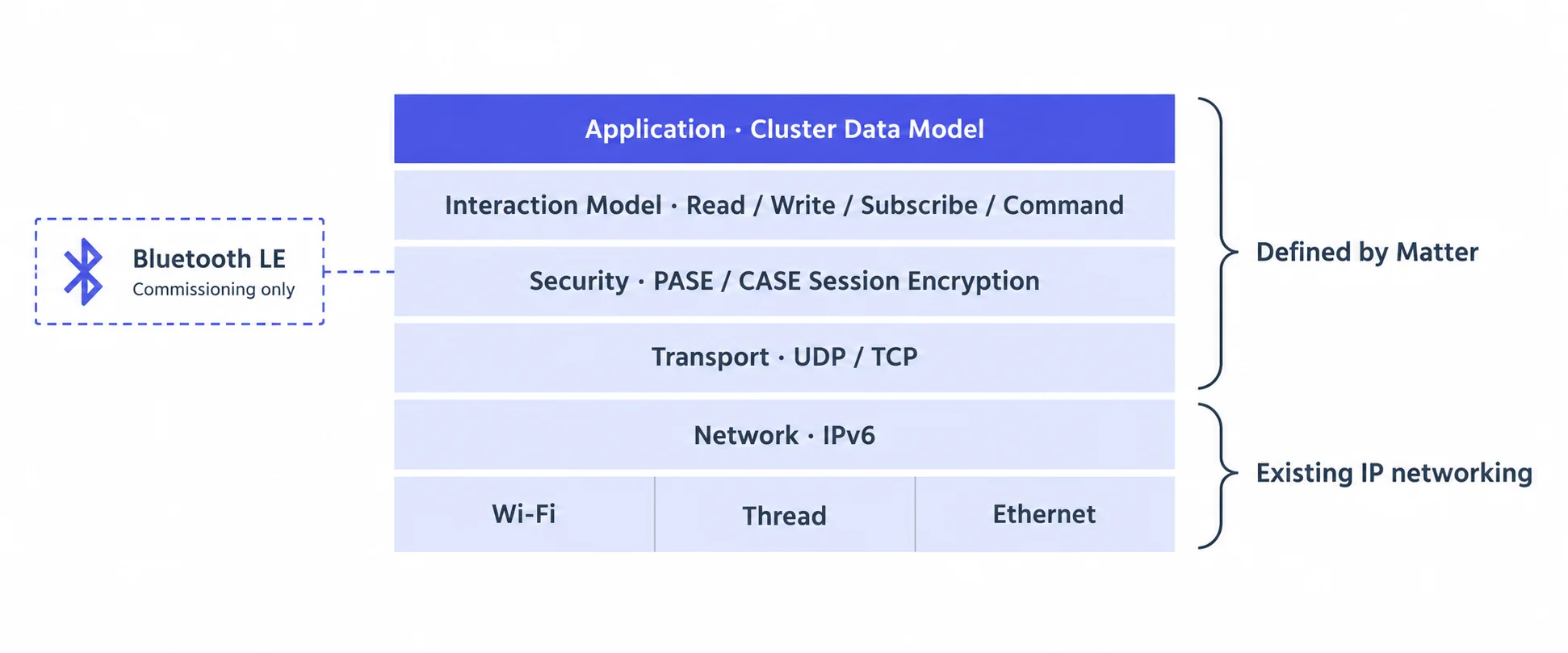
To see which layers Matter, Zigbee, Z-Wave and Bluetooth Mesh each cover and how they compare, see the Protocol Comparison. Whether a device should use Thread or Wi-Fi, and whether your home needs a hub, are covered in Thread vs Wi-Fi and Hubs, Border Routers and Bridges.
Matter's Four-Layer Data Model
Matter organizes all of a device's capabilities into four layers. This is the most fundamental concept in Matter -- understand it and you understand most of the protocol.
Imagine a smart building -- this analogy will help you see the whole structure at a glance:
If the building analogy doesn't click, think of your phone instead: Node = the phone itself, Endpoint = an app on the phone, Cluster = a feature module within the app, Attribute = information you can see (battery at 80%), Command = actions you can perform (take a photo, send a message).
Let's go through each layer in detail.
Node
A Node is a physical device on the network. A door lock is a Node, a light bulb is also a Node.
Analogy: a smart building. The building itself is a Node -- it has different rooms inside, and each room is equipped with different systems.
A Matter door lock is a Node. Once it joins the Matter network via WiFi or Thread, a controller (such as a phone app) can discover and operate it.
Endpoint
A Node can have multiple Endpoints, and each Endpoint is an independent functional area.
Analogy: different rooms in a building. The management office handles building-level affairs (utilities, maintenance), while tenant rooms are where actual living happens. Endpoints work the same way -- different endpoints serve different purposes.
Matter defines two types of Endpoints:
Endpoint 0 is required on every Matter device -- it holds the device's "ID card" and "system settings". In daily work, you mainly interact with Endpoint 1 (the application endpoint), where the door lock's lock/unlock and user management live.
Cluster
Cluster is the most important concept in the Matter data model. A Cluster defines a set of related capabilities -- including what states it has (Attributes) and what operations it supports (Commands).
Analogy: a system within a room. A room might have a lighting system, an HVAC system, and a door lock system. Each system manages one category of things, with its own state and controls. A Cluster is exactly such a functional system.
Each Cluster has a standard ID (hexadecimal), assigned by the CSA:
| Cluster ID | Name | What it does |
|---|---|---|
0x0101 |
DoorLock | Door lock system -- lock, unlock, manage users |
0x002F |
PowerSource | Power system -- battery level, charging status |
0x0006 |
OnOff | Switch system -- on, off, toggle |
0x0028 |
BasicInformation | Nameplate info -- vendor, product name, firmware version |
0x001D |
Descriptor | Directory -- lists which Clusters an endpoint has |
A Matter door lock's Endpoint 1 typically has these Clusters:
- DoorLock (0x0101) -- core functionality: lock, unlock, manage users and credentials
- PowerSource (0x002F) -- battery info: charge level, charging status
- Identify (0x0003) -- identification: makes the lock flash or beep so the user can locate it
Attribute
An Attribute is a piece of state information within a Cluster, and each Attribute also has an ID. Think of it as a reading on a device dashboard -- you can check it, and some can be adjusted.
Some Attributes are read-only (e.g. the current lock state), while others are writable (e.g. setting the auto-relock time).
| Attribute ID | Cluster | Name | Meaning |
|---|---|---|---|
0x0 |
DoorLock | LockState | Current lock state (is it locked?) |
0x23 |
DoorLock | AutoRelockTime | Auto-relock delay (how long before it auto-locks?) |
0xC |
PowerSource | BatPercentRemaining | Battery remaining (how much charge is left?) |
Command
A Command is an operation that a Cluster supports -- like a button on a remote control. Press it, and the device performs the corresponding action.
| Command ID | Cluster | Name | Meaning |
|---|---|---|---|
0x0 |
DoorLock | LockDoor | Lock (press the "Lock" button) |
0x1 |
DoorLock | UnlockDoor | Unlock (press the "Unlock" button) |
0x26 |
DoorLock | SetUser | Add/modify a user (register a new tenant) |
Full Example: A Door Lock's Matter Data Structure
Putting all the concepts together, a door lock's Matter data structure looks like this:
Node (Door Lock Device -- the entire building)
├── Endpoint 0 (Management Endpoint -- management office)
│   ├── BasicInformation (0x0028)    → Vendor name, product name, serial number
│   ├── Descriptor (0x001D)          → Lists which Clusters this endpoint has
│   └── NetworkCommissioning (0x0031)→ WiFi/Thread network configuration
│
└── Endpoint 1 (Application Endpoint -- tenant room)
    ├── DoorLock (0x0101)            → Door lock system
    │   ├── Attribute 0x0: LockState     = 0x01 (Locked)
    │   ├── Attribute 0x23: AutoRelockTime = 30 (auto-relock in 30s)
    │   ├── Command 0x0: LockDoor         → Lock
    │   └── Command 0x1: UnlockDoor       → Unlock
    │
    ├── PowerSource (0x002F)         → Power system
    │   ├── Attribute 0x0: Status        = 1 (Active)
    │   └── Attribute 0xC: BatPercent    = 180 (actual 90%)
    │
    └── Identify (0x0003)            → Identification system
└── Command 0x0: Identify → Flash/beepWhen someone says "Endpoint 1 / Cluster 0x0101 / Attribute 0x0 value is 0x01", in plain language that means: on the application endpoint, the door lock module's current lock state is "Locked".
Device Type
A Device Type specifies which Clusters a device must support. It is like a certification checklist.
For example, the "DoorLock" Device Type requires a device to implement at least the DoorLock Cluster, Identify Cluster, etc. "Dimmable Light" requires the OnOff Cluster and the LevelControl Cluster.
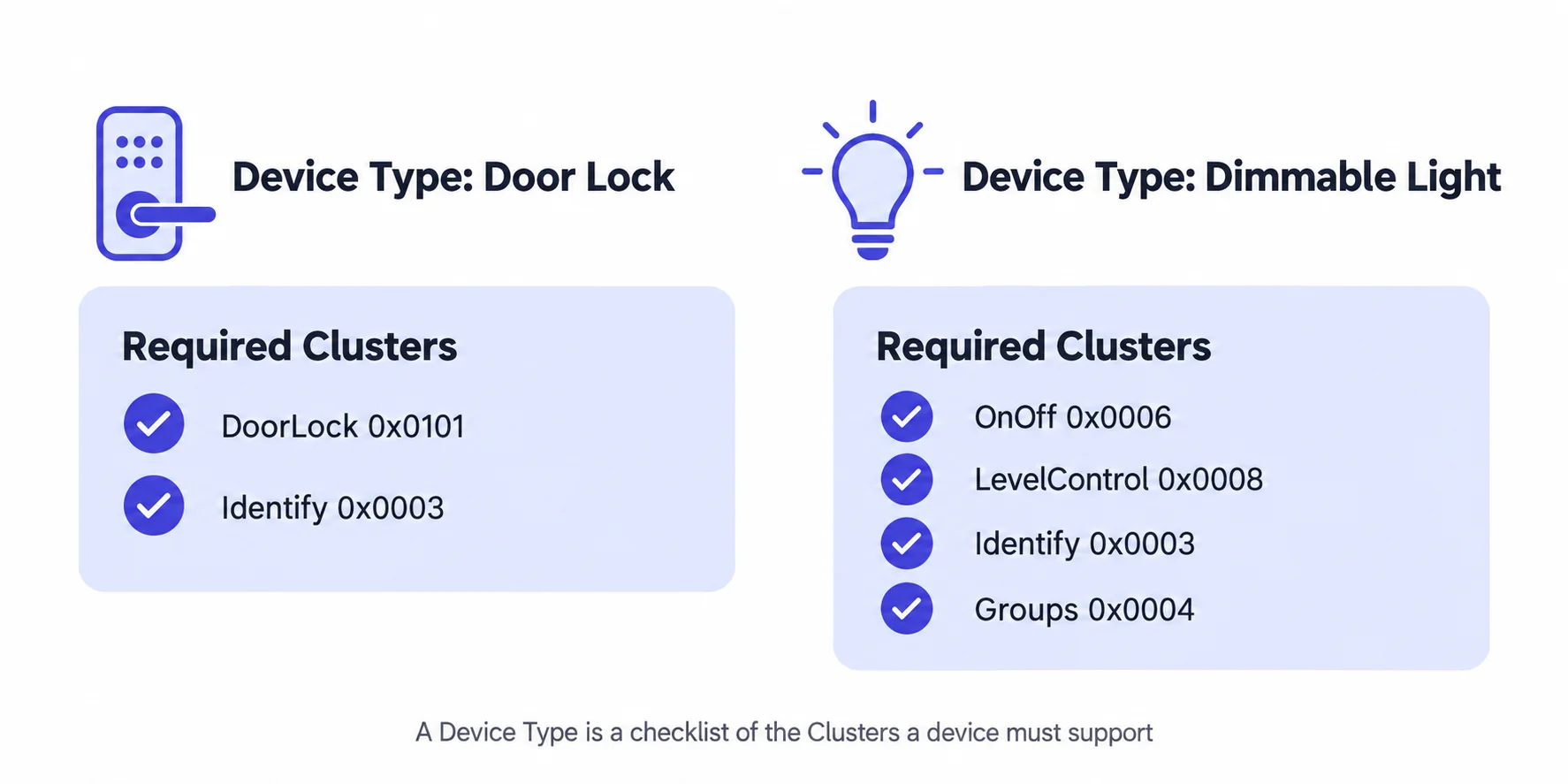
Analogy: just as a hotel must have a gym, pool, and 24-hour front desk to earn a five-star rating, a device must have the capabilities specified by Matter to claim a certain device type.
Every device type has a number: Door Lock is 0x000A, Dimmable Light is 0x0101, and the Root Node that every device has is 0x0016.
A device declares its types in the Descriptor.DeviceTypeList of each endpoint, and one endpoint can declare several (e.g. "Door Lock + Power Source").
See the full list in Matter ID Lookup · Device Type IDs.
Two locks can both declare Door Lock 0x000A while one supports fingerprints and user management and the other only PIN codes. Both are compliant.
The device type only fixes the mandatory part; optional capabilities are in each cluster's FeatureMap, AttributeList and AcceptedCommandList.
See Reading a device's capabilities after commissioning below.
Fabric
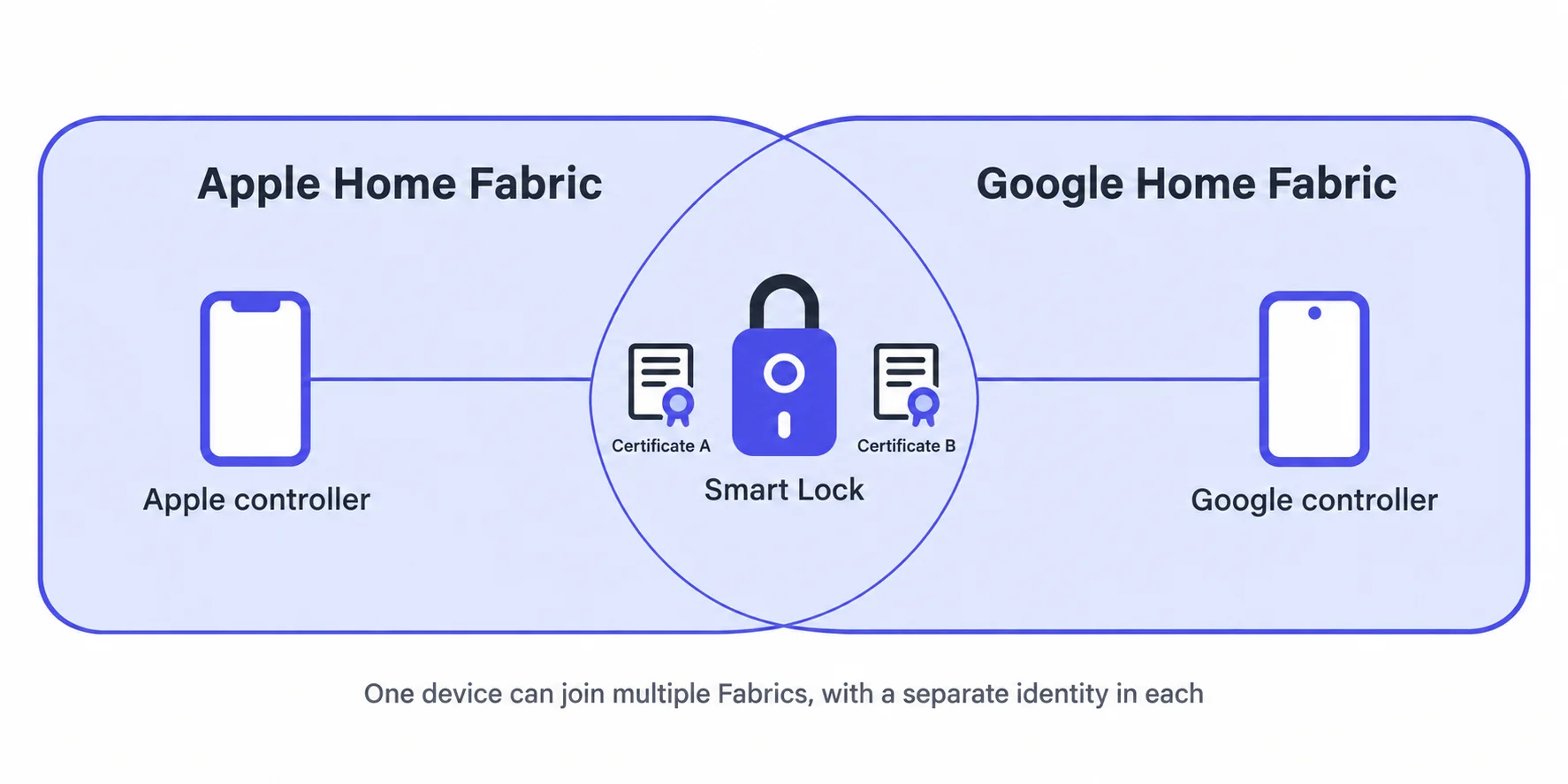
A Fabric is a trust domain in a Matter network. Devices within the same Fabric trust each other and can communicate and control one another directly.
Analogy: a corporate intranet. When your laptop connects to the company VPN, it is inside a trust domain and can access internal services. People not on the VPN cannot.
A device can join multiple Fabrics simultaneously. For example, a door lock can be controlled by both Apple Home and Google Home at the same time -- it has a separate identity in each Fabric.
Commissioner and Commissioning
The process of adding a device to a Fabric is called Commissioning. The device that performs this operation is called the Commissioner.
The commissioning flow in brief:
- The Commissioner (typically a phone app) scans the device's QR code or enters a setup code
- The device is discovered over Bluetooth LE (it is not on the network yet, so Bluetooth is the only way to reach it)
- A secure session is established via PASE (Passcode-Authenticated Session Establishment)
- The Commissioner assigns a certificate (NOC) to the device, officially adding it to the Fabric
- The Commissioner sends the Wi-Fi or Thread network credentials to the device so it can join the home network
- After commissioning, the phone app or smart speaker acts as a Controller and can read Attributes and send Commands to control the device
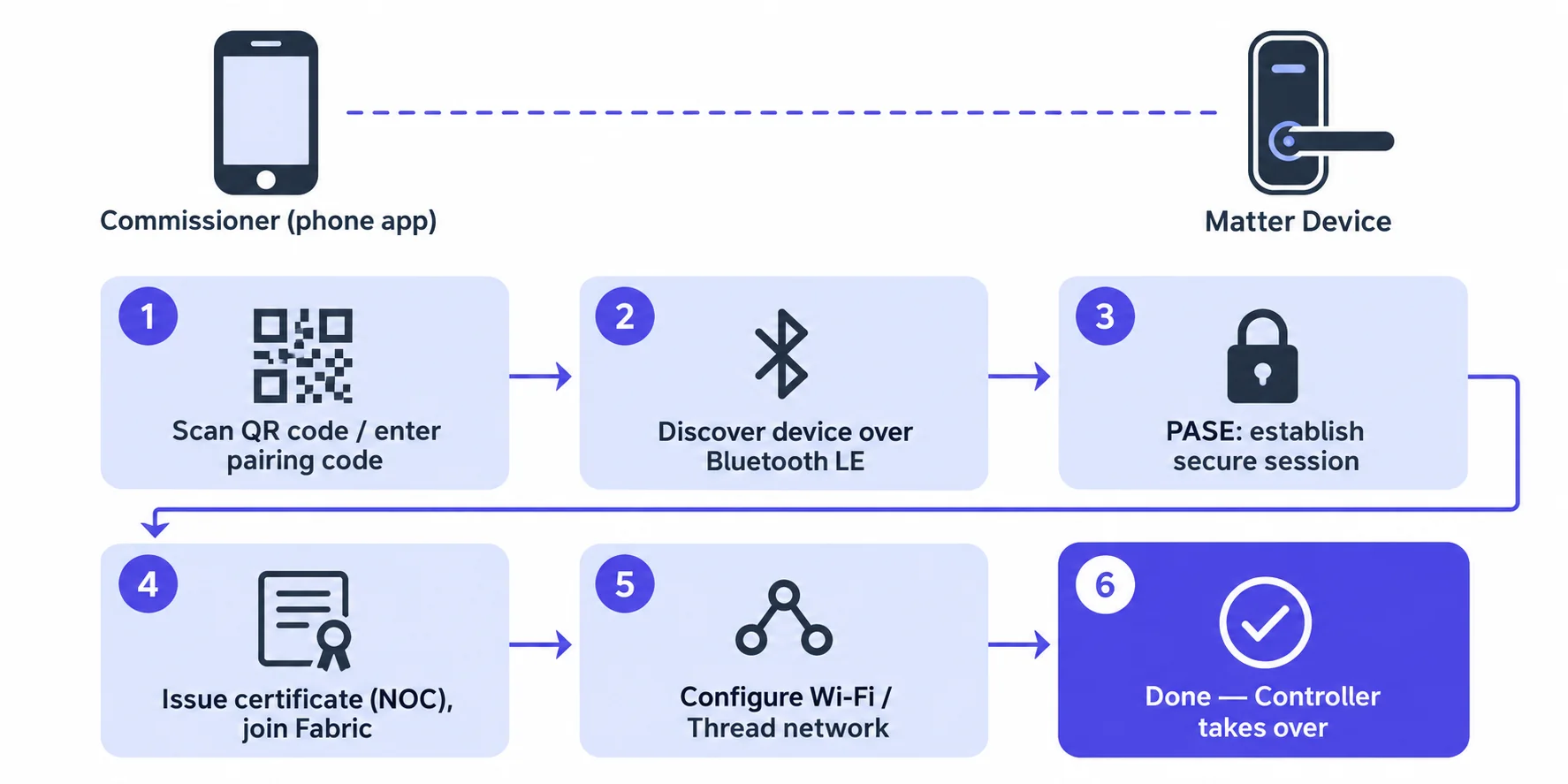
The Commissioner is the role during commissioning (responsible for bringing the device in), while the Controller is the role for everyday control. A phone app typically plays both roles.
After commissioning: what is this device and what can it do?
Commissioning only brings the device onto the network. Next the app needs to answer two questions: what device is this, and which features does it support? Matter has no separate "device manual" file. The answers live in a few standard fields that every device must provide and any Controller can read.
| To find out | Read this field | Where (cluster / attribute) | Door lock example |
|---|---|---|---|
| Which endpoints exist | Descriptor.PartsList | Endpoint 0 · 0x001D / 0x0003 | [1] |
| What each endpoint is | Descriptor.DeviceTypeList | Every endpoint · 0x001D / 0x0000 | 0x000A Door Lock + 0x0011 Power Source |
| Which clusters each endpoint has | Descriptor.ServerList | Every endpoint · 0x001D / 0x0001 | 0x0003 0x001D 0x002F 0x0101 |
| Which optional features a cluster enables | FeatureMap (global attribute) | Every cluster · 0xFFFC | 389 = PIN + fingerprint + remote PIN + users |
| Which commands it accepts | AcceptedCommandList (global attribute) | Every cluster · 0xFFF9 | LockDoor, UnlockDoor, SetUser… |
| Which attributes it implements | AttributeList (global attribute) | Every cluster · 0xFFFB | LockState, AutoRelockTime… |
| Vendor, model, versions, serial | BasicInformation | Endpoint 0 · 0x0028 | VendorName, ProductName, SoftwareVersionString |
The standard reading order for a Controller:
- Read PartsList on endpoint 0 to get every endpoint number
- Read DeviceTypeList on each endpoint to learn what it is
- Read ServerList on each endpoint to learn which clusters it has
- Read FeatureMap / AcceptedCommandList / AttributeList on each cluster to learn exactly what it can do
- Read BasicInformation on endpoint 0 for vendor, model and firmware version
Can I get the device's raw capability set?
Yes. Matter supports a wildcard read: set endpoint, cluster and attribute all to "any" and every attribute on the device comes back in one go, including all the fields above. This is the most complete, unprocessed description of a device. Whatever device info an app shows is interpreted from it.
- chip-tool (the official CLI):
chip-tool any read-by-id 0xFFFFFFFF 0xFFFFFFFF <node-id> 0xFFFF. The three wildcards mean all clusters, all attributes, all endpoints - A single field:
chip-tool descriptor read device-type-list <node-id> 1reads the device types of endpoint 1 - Platform SDKs: Android, iOS and Web all have equivalents, see SDK Guides · Reading device types and capabilities
- Home Assistant: device page → Download diagnostics. Its
attributesobject is the wildcard read result, keyed asendpoint/cluster/attribute(decimal)
Open the JSON Parser, pick the "Raw device data" sample and click Parse. It turns a door lock's wildcard read into a device profile and labels every item with the field it came from. For any unfamiliar ID, use the Matter ID Lookup.
ID Numbering Conventions
Nearly everything in Matter is identified by a hexadecimal ID. Knowing the ID ranges helps you quickly determine what an ID represents.
In the specification, cluster, attribute, command, event and device type IDs are all 32-bit: the upper 16 bits are a vendor prefix and the lower 16 bits are the number.
Standard definitions all use the prefix 0x0000, which is normally omitted. So the Door Lock cluster is 0x0000_0101 in full and 0x0101 for short.
A vendor's private extension must carry its vendor ID, e.g. 0x1234_FC00.
| Type | Number range (lower 16 bits) | Description |
|---|---|---|
| Standard Cluster | 0x0000 ~ 0x7FFF |
Defined by CSA; the prefix is always 0x0000 |
| Vendor-specific Cluster | 0xFC00 ~ 0xFFFE |
The prefix must be the vendor ID, e.g. 0x1234_FC00 |
| Standard Attribute | 0x0000 ~ 0x4FFF |
Standard attributes within a Cluster |
| Global Attribute | 0xF000 ~ 0xFFFE |
Present in every cluster: FeatureMap 0xFFFC, AttributeList 0xFFFB, AcceptedCommandList 0xFFF9, ClusterRevision 0xFFFD, etc. |
| Standard Command | 0x00 ~ 0xFF |
Standard commands within a Cluster |
| Standard Device Type | 0x0000 ~ 0xBFFF |
Device types, e.g. 0x000A Door Lock, 0x0016 Root Node |
Found an ID you don't recognise? Look it up in the Matter ID Lookup. Hex and decimal both work.
Note that the same number means different things in different fields: 0x0101 is Door Lock as a cluster but Dimmable Light as a device type.
Common Cluster ID Quick Reference
| ID | Cluster | Purpose |
|---|---|---|
0x001D | Descriptor | Describes the list of Clusters on an endpoint |
0x0028 | BasicInformation | Device basic info (vendor, product name, firmware version) |
0x002F | PowerSource | Power / battery status |
0x0031 | NetworkCommissioning | Network configuration (WiFi/Thread) |
0x0003 | Identify | Device identification (flash/beep) |
0x0006 | OnOff | On/off control |
0x0008 | LevelControl | Brightness / level control |
0x0101 | DoorLock | Door lock control |
0x0300 | ColorControl | Color control (color temperature, HSV) |
The complete Matter specification is published by the CSA; members can download it at csa-iot.org. The open-source implementation is in the connectedhomeip repository, where src/app/zap-templates/zcl/data-model/chip/*.xml contains all standard Cluster definitions.